> ## Documentation Index
> Fetch the complete documentation index at: https://docs.accessowl.com/llms.txt
> Use this file to discover all available pages before exploring further.
# Vanta
The Vanta integration with AccessOwl supports two distinct capabilities, automated provisioning of admin acccounts as well as synchronizing Access Review evidence.
## Capabilities
AccessOwl grants Vanta admin access during access requests. Only manages admin users, no employees.
AccessOwl deactivates Vanta admin access during access revocations. Only manages admin users, no employees.
AccessOwl uploads access control evidence to compliance vendors such as Vanta.
# Setup Guides
From your AccessOwl application dashboard, navigate to **Vanta** and click the **+** icon.
 Choose **API Integration** from the list of available integrations.
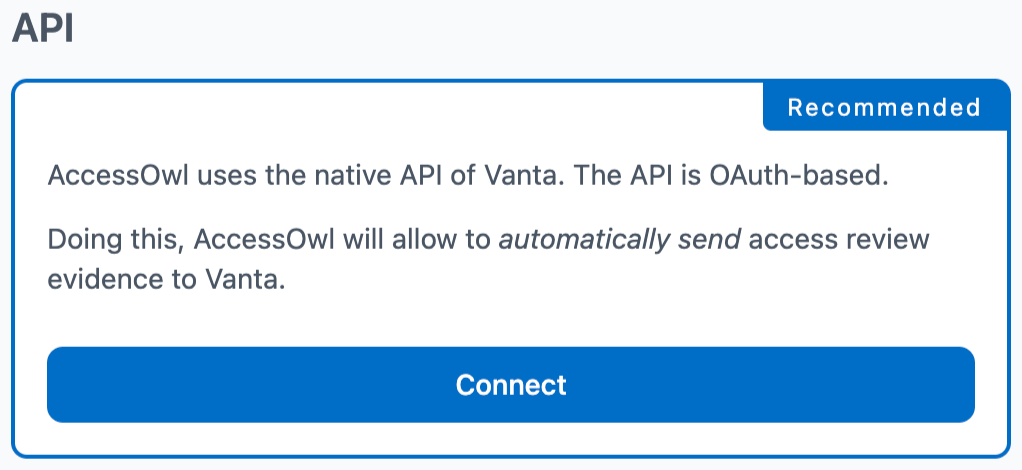 Log in to Vanta and follow the OAuth flow to authorize AccessOwl.
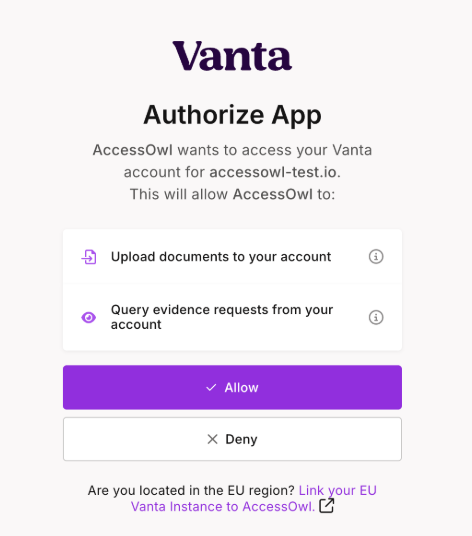 After the success message, every finished Access Review in AccessOwl will automatically be sent to your Vanta Access Review evidence section.
From your AccessOwl application dashboard, navigate to **Vanta** and click the **+** icon.
Choose **Integration Account** from the list of available integrations.
Invite the integration account into Vanta with **Admin permissions**.
Once the integration is fully set up, AccessOwl will confirm the connection. From this point forward, all future access requests and revocations of admin users will be performed automatically.
# FAQ
Ensure the OAuth connection between AccessOwl and Vanta remains active. Re-authenticate if needed.
Confirm the Access Review has been completed and appears in AccessOwl’s review history.
Verify that the integration account was invited to Vanta with Admin permissions.
Vanta only marks a person as fully offboarded once every application account assigned to them inside Vanta has been deactivated. The AccessOwl integration account removes only the Vanta access itself, not the other apps tied to that person.
If you have an identity provider such as Google Workspace or Microsoft 365 connected to Vanta, suspending the user there already starts Vanta's termination and marks their record as Terminated. By the time the AccessOwl integration account goes to remove the Vanta access, Vanta has usually handled it already, so the revocation comes back as a reassignment error instead of completing cleanly.
Vanta also requires a manual **Complete offboarding** action in the person's Offboarding tab once all of their accounts are deactivated. AccessOwl does not perform this final step.
After the success message, every finished Access Review in AccessOwl will automatically be sent to your Vanta Access Review evidence section.
From your AccessOwl application dashboard, navigate to **Vanta** and click the **+** icon.
Choose **Integration Account** from the list of available integrations.
Invite the integration account into Vanta with **Admin permissions**.
Once the integration is fully set up, AccessOwl will confirm the connection. From this point forward, all future access requests and revocations of admin users will be performed automatically.
# FAQ
Ensure the OAuth connection between AccessOwl and Vanta remains active. Re-authenticate if needed.
Confirm the Access Review has been completed and appears in AccessOwl’s review history.
Verify that the integration account was invited to Vanta with Admin permissions.
Vanta only marks a person as fully offboarded once every application account assigned to them inside Vanta has been deactivated. The AccessOwl integration account removes only the Vanta access itself, not the other apps tied to that person.
If you have an identity provider such as Google Workspace or Microsoft 365 connected to Vanta, suspending the user there already starts Vanta's termination and marks their record as Terminated. By the time the AccessOwl integration account goes to remove the Vanta access, Vanta has usually handled it already, so the revocation comes back as a reassignment error instead of completing cleanly.
Vanta also requires a manual **Complete offboarding** action in the person's Offboarding tab once all of their accounts are deactivated. AccessOwl does not perform this final step.