

Steps
1
Sync your HR system into Google Workspace
Set up your HR system to provision employees and their data into Google Workspace. The exact steps depend on your HR system. For Rippling, see Rippling.
2
Create custom fields in Google Workspace
- Sign in to the Admin Console as a super administrator.
- Go to Directory → Users.
- At the top, select More options → Manage custom attributes.
- Click Add Custom Attribute.
- Enter a Category name (this is your schema name, which you provide to AccessOwl when finalizing the setup) and add two fields of type Date: one for the start date and one for the end date. For example:
start_dateend_date
- Configure your HR system to fill these fields for each user, or set them manually for at least one user.
AccessOwl.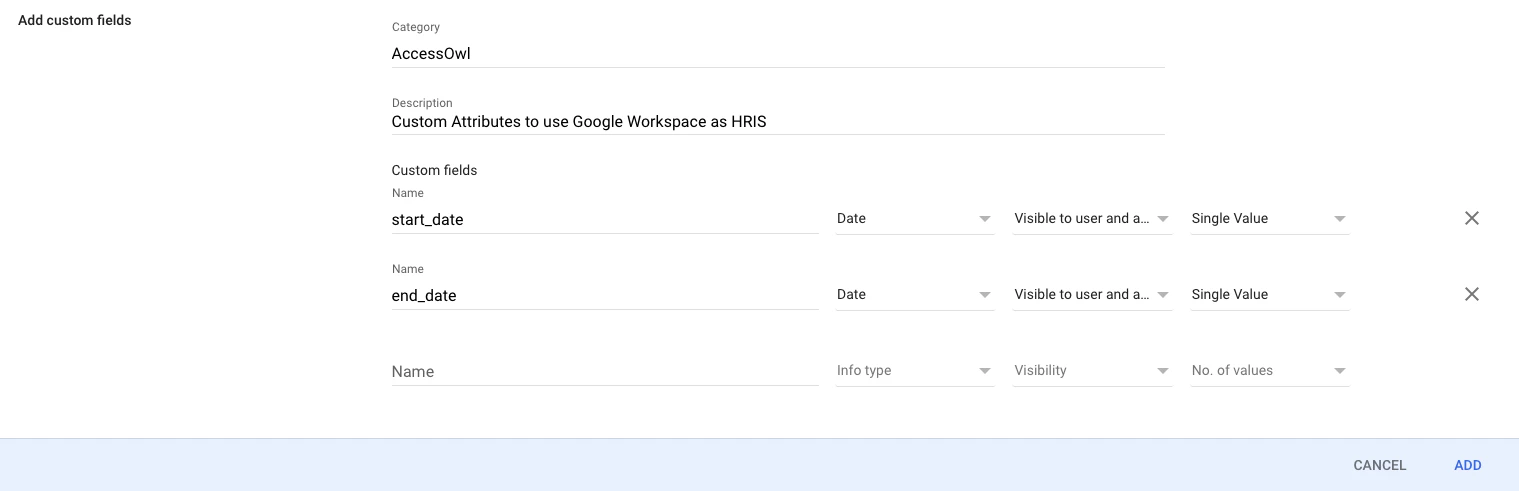
The field names above are examples. You can choose your own names and provide AccessOwl with the exact names when finalizing the setup. AccessOwl configures the mapping to these names, so they must match what is in Google Workspace.
Finalizing the setup with AccessOwl
After syncing your HR system with Google Workspace, contact AccessOwl support and provide:- Schema name (shown as Category in the Google Admin Console)
- Start date attribute name
- End date attribute name
- Automatically onboard users based on the start date field.
- Automatically offboard users based on the end date field.
- Sync all other fields (department, role, manager) from Google Workspace.
How the mapping appears in AccessOwl
To see the finished mapping, go to Settings → General → Directory Integrations and open your Google Workspace integration. The Custom HRIS Field Mappings section shows your schema name and the two Google Workspace attributes AccessOwl reads.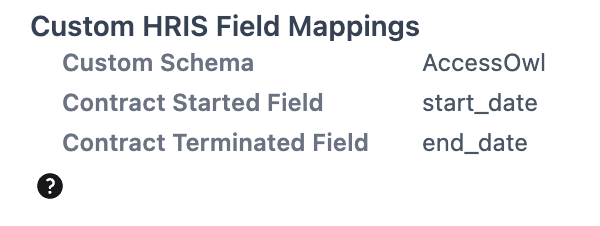
Contract Started Field and Contract Terminated Field apply to every user, full-time employees included. Each user has one start date and one end date, so these two mappings hold the date a user starts and the date a user leaves, whatever their employment type.