

Capabilities
Structure Sync
AccessOwl periodically syncs the permissions schema of an application.
User Sync
AccessOwl periodically syncs a list of users along with their assigned permissions.
Setup
When connecting this integration, ensure that you click the Grant button for your organization.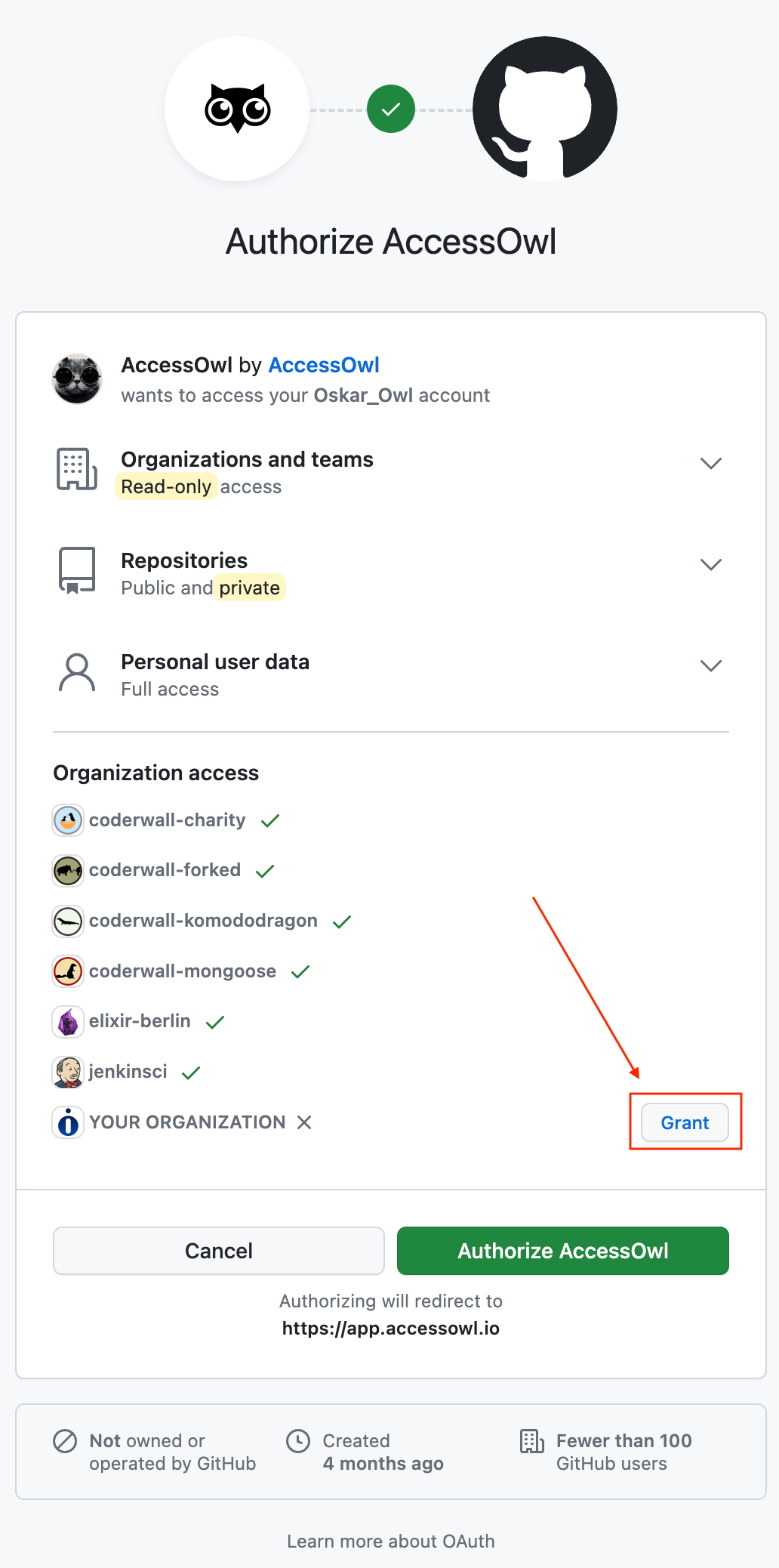
Multiple Organizations
If you have more than one GitHub organization, you can manage them all under a single AccessOwl integration. The user who connects the integration must have access to all the organizations you want to manage. To add an additional organization, reconnect the integration (see below) and select all the organizations you want to manage during the OAuth grant step.Reconnecting
Reconnect GitHub when AccessOwl tells you that the connection stopped working, or that it is connected but has no access to your organization. In both cases, revoke AccessOwl in GitHub first. Otherwise GitHub reuses the old authorization and skips the step where you grant access to your organization.- Go to Authorized OAuth Apps in Github, find AccessOwl and revoke access.
- In AccessOwl trigger the reauthentication flow by clicking here.
-
On the GitHub authorization screen, click Grant next to your organization before clicking
Authorize. Only an organization owner can complete this. A regular member can request the
grant, an owner then has to approve it. If your organization uses SAML single sign-on, sign in
through SSO first (
https://github.com/orgs/<your-organization>/sso). Without an active SSO session, AccessOwl can’t access your organization even after you authorize it.
If the reauthentication link or the Retry button brings you straight to the success screen without showing a GitHub authorization prompt, and the sync keeps failing, AccessOwl still holds an active GitHub grant. Revoke the AccessOwl app in GitHub first (step 1 above), then trigger the reauthentication again so the OAuth grant step actually runs.The same cause applies when the reconnect looks successful but the app keeps showing “the sync has not returned any data yet. Please check back later”. The authorization went through, the organization grant did not, so there is nothing for AccessOwl to read.AccessOwl alerts your Slack admins when the GitHub connection stops working, or when AccessOwl has no access to your organization. The alert links to this guide. The dashboard also lists GitHub under Needs Attention until a sync succeeds again. After you reconnect, AccessOwl syncs again automatically.
If your GitHub organization restricts third-party applications, an owner also has to approve AccessOwl under Settings > Third-party Access > OAuth app policy in GitHub before the connection goes live.
FAQ
Can AccessOwl provision and deprovision GitHub accounts?
Can AccessOwl provision and deprovision GitHub accounts?
No. AccessOwl cannot create, remove, or suspend GitHub accounts, including on GitHub Enterprise. GitHub access is tracked and reviewed in AccessOwl, but it is granted and revoked in GitHub by an admin.This also applies during offboarding: the GitHub removal is reassigned to the Application Admin, who removes the member in GitHub and confirms the task in AccessOwl.
Why are there GitHub users we do not recognise?
Why are there GitHub users we do not recognise?
AccessOwl syncs every account that has access to the repositories in the connected organizations. That includes outside collaborators, and for a repository forked from a public or open-source project, the upstream contributors who carry over with the fork. These are real GitHub accounts with access, not a sync error.If you only want to manage some of your organizations, scope the integration during the OAuth grant step, see Multiple Organizations.
Why do GitHub members show up as 'Unidentified user'?
Why do GitHub members show up as 'Unidentified user'?
GitHub does not expose member email addresses, so AccessOwl cannot auto-match GitHub accounts to your existing people by email the way it does for an integration like Google Workspace. Members are identified by their GitHub handle instead, which is why they arrive as Unidentified.This does not reduce the value of the sync. You map each GitHub handle to the right person once, and from then on AccessOwl ties that handle’s access back to the user for visibility and access reviews. The mapping persists across future syncs, so it is a one-time match per account, not something you redo on every sync.A mapping is not final. To remap an account, open the GitHub application in AccessOwl and go to the Assigned Users tab. Click the unlink icon next to the handle to detach it from the wrong person, then find the account under the Unidentified Users tab, type the correct user’s name and click Assign.
A user access discovery scan does not move an existing mapping, so re-running discovery does not correct a wrong assignment.