Connect an application with Google Workspace or Microsoft Entra ID so AccessOwl manages access through directory group membership
If access to an application is granted through membership in a Google Workspace or Microsoft Entra ID group, you can connect it in AccessOwl as an identity-provider-managed application. AccessOwl then grants and revokes access by adding or removing users from the linked directory groups, and your identity provider handles the actual sign-in or account provisioning, for example via SAML or SCIM. AccessOwl never changes accounts inside the application itself.
Choose Manage by Identity Provider only when group membership is what actually grants access to the application. The typical case is a SAML application where being in the group is what enables the sign-in.If users have accounts inside the application that need to be created, licensed, or removed individually, group membership alone does not manage their access. Connect the application through the integration account instead. The Choose Integration step shows the available options for each application and marks the recommended one.If your identity provider handles sign-in through SAML but does not provision accounts through SCIM, group membership authorizes the sign-in and nothing else. AccessOwl adds and removes people in the group, and nobody creates or deactivates the account in the application. Cover the account itself with a Manual Resource, for example Account, so an approved request or a revocation raises a task for the Application Admin.
The directory group already exists in Google Workspace or Microsoft Entra ID, and its membership is what grants access to the application. You select from your existing groups, AccessOwl does not create them.
The application is not already connected through another integration. An application uses either an identity provider or an integration account, never both at the same time.
Once an application is switched to identity-provider management, the integration account is no longer used for it and can be removed from the application.
Connecting an application through your identity provider
1
Add the application
Go to Applications, click New Application, and select your application from the list.
2
Choose the identity provider
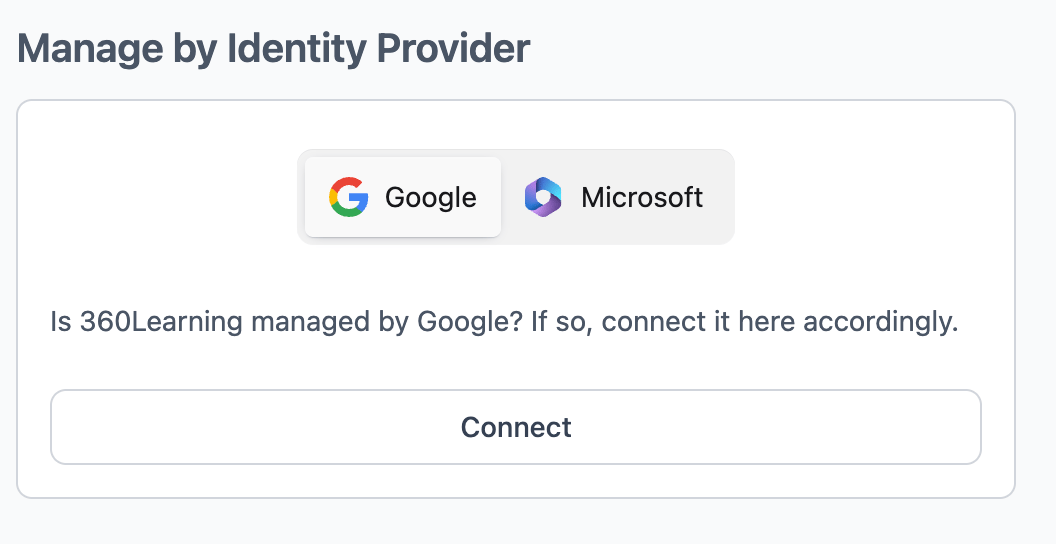
On the Choose Integration step, select your identity provider under Manage by Identity Provider and click Connect. The toggle shows the directories connected to your AccessOwl account.
The Manage by Identity Provider option on the Choose Integration step
Connecting an application this way removes all permissions AccessOwl already tracked for it, including permissions from a user list import. Connect first and let the sync populate the access, then record any permissions not linked to a group.
3
Link the groups
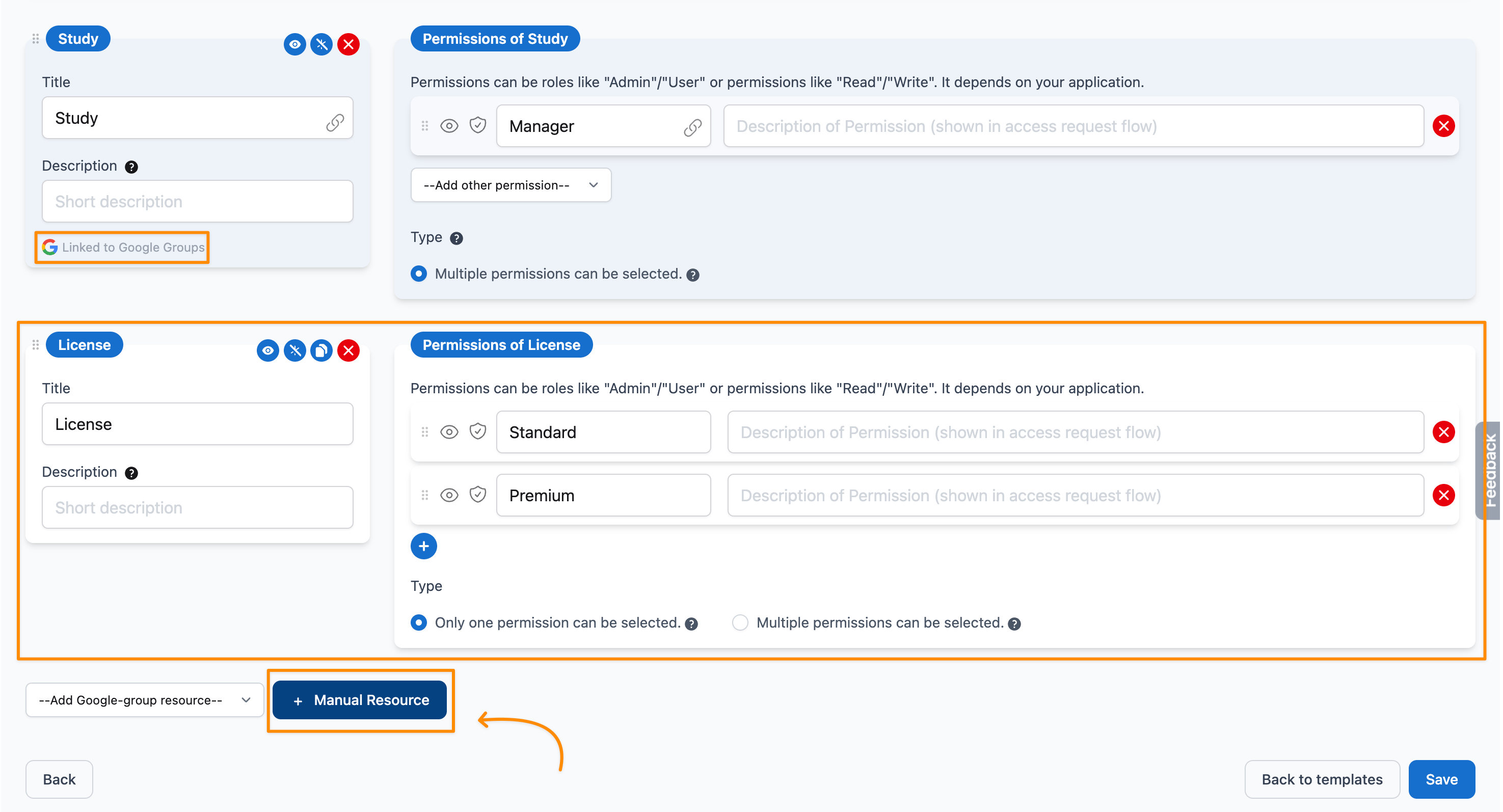
In the permission editor, add each group from the Add Google-group resource or Add Microsoft-group resource dropdown, depending on your identity provider. Every linked group becomes its own resource, marked Linked to Google Groups or Linked to Microsoft Groups, and its membership roles can be added as requestable permissions with Add other permission. Google groups offer Member, Manager, and Owner; Microsoft Entra ID groups offer Member and Owner. Once every membership role of the group is added, Add other permission has nothing left to offer and is disabled. Double-check that the selected group is the one you intend.
Linking Google groups in the permission editor
Only the membership roles you add are synced. If you add Member only, people who hold Manager or Owner in that group do not show up in AccessOwl and are not covered by reviews or offboarding. Add every role you want visible, you can hide the ones you do not want requestable yet.
Link at least one group. Without a linked group the application still shows as connected and synced, but there is nothing to add users to, so access requests cannot be fulfilled.
You can combine group-based provisioning with manually managed permissions on the same application. Use Manual Resource in the permission editor to add a resource that is not linked to a directory group. Its permissions are not provisioned automatically: when one is requested and approved, the task is assigned to the Application Admin to complete manually.For example, the Study resource below is linked to a Google group and granted automatically, while the manually added License resource is forwarded to the Application Admin, who assigns the license in the application.
A group-linked resource next to a manually managed License resource
To record who already holds a manual permission without raising a request for each person, go to Reports, open Manual update, select the application and click New Access. Pick the permission and the users, then save. The Manual Access Update button is not shown on the page of an application with user sync, but the same screen is available from Reports. The group-linked permissions keep syncing as before.
To move an application away from group-based provisioning, whether you want to switch to the integration account or stop managing it this way altogether, archive the application using Archived on its edit screen, then add it again and choose the connection method you want. The link to the groups cannot be removed on its own, so archiving the application is the way to undo it.
Archiving an application closes every pending approval on that app. Any open access requests need to be raised again after the application is added back.
Applications where group membership is what grants access. SAML applications are usually a great fit, since being in the group is what enables the sign-in.
Does AccessOwl assign roles or licenses inside the application?
No. In this mode access is purely group membership. Anything managed inside the application itself, such as roles or paid licenses that are assigned separately from the group, stays with the application. If that is how your application works, connect it through the integration account instead, or track those extras on the same application as permissions not linked to a group.
Why is Add other permission greyed out?
The dropdown only offers the membership roles of the linked group itself, not the roles inside the application. A Google group has three membership roles (Member, Manager, Owner) and a Microsoft Entra ID group has two (Member, Owner). Once every membership role is added to the resource, there is nothing left to offer and the dropdown is disabled. To make the application’s own roles requestable, add them as permissions not linked to a group.
Why are some group members missing in AccessOwl?
Only the membership roles you added in the permission editor are synced. If a group is linked with Member only, people who hold Manager or Owner in that group do not appear in AccessOwl and are not covered by reviews or offboarding. Add the missing roles as permissions to bring those members in.
Do I need to create a dedicated group for this?
AccessOwl links groups that already exist in your directory. If no group currently controls access to the application, group-based management is likely not the right fit, and the integration account is the better path.
Can an application use both an integration account and group management?
No. Each application is connected one way or the other. To change how an application is connected, see Switching or disconnecting.